
Ultimate Painter✓
- Name :
- Ultimate Painter
- Category:
- Entertainment
- Safety :
- 100% Safe
- Price:
- free
- Developer:
- cmyksoft
- Download :
- 1M+
Screenshot
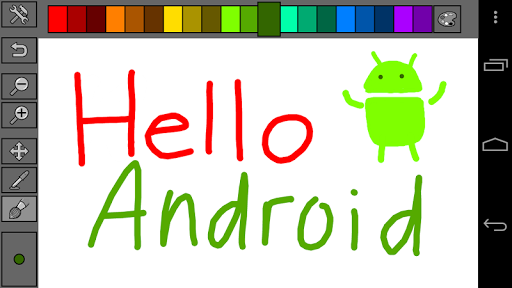


App Intro
This intuitive painting application transforms your mobile device into a versatile digital canvas, perfect for artists of all levels. Whether you're a seasoned professional looking for a portable sketching tool or a parent seeking a fun, creative outlet for your children, this app offers a straightforward yet powerful experience. Its core functionality revolves around a simple brush tool, allowing users to bring their ideas to life with just a touch. The app supports various image formats for opening and saving, making it easy to import existing work or share your creations. The inclusion of an undo mode provides a safety net for experimentation, while customizable brush sizes and paint opacity offer control over your artistic expression. With pre-set color palettes and the ability to fine-tune colors using RGB, HSL, and HBL models, this app empowers you to achieve the exact look you desire. It's a worthwhile download for anyone who enjoys digital art or wants to explore their creative side on the go.
Pros
- Simple and intuitive interface for all ages.
- Customizable brush size and paint opacity.
- Supports various image import and PNG export.
- Built-in color palettes and custom color mixing.
- Undo function for error correction.
Feature Guides
- Create digital art with ease using a simple yet effective brush tool, allowing for freehand drawing and painting directly on your device's screen.
- Customize your artistic process by adjusting brush size and paint opacity to achieve desired strokes and effects, from fine lines to broad washes.
- Leverage a diverse range of pre-prepared color palettes or create your own, with advanced color customization options using RGB, HSL, and HBL models for precise hue selection.
- Import existing images in common formats like PNG, GIF, JPG, and BMP to use as a base for your artwork or for tracing purposes. Save your finished masterpieces in high-quality PNG format.
Recent Improvements
Recent updates have focused on refining the user experience, particularly in color management and brush control. Users will notice a smoother interaction when adjusting brush opacity and size, leading to more precise artistic input. The color palette system has also seen enhancements, making it simpler to switch between existing palettes and customize new ones. We've also improved the performance when opening and saving larger image files, ensuring a more seamless workflow for those working on more detailed projects. These refinements aim to provide a more fluid and responsive painting environment.
User reviews
This app is surprisingly capable for a simple painting tool! I love how easily I can switch colors and adjust the brush size. Perfect for quick sketches on the go. 😊
Great for kids! My daughter spends hours drawing with this. It's easy to use, and I don't have to worry about a mess. The undo button is a lifesaver!
 Freeview AUEntertainment
 Stan.Entertainment
 10 playEntertainment
 BingeEntertainment
 Ticketek AUEntertainment
 LotterywestEntertainment
 ABC KidsEntertainment
 LiteTVEntertainment
 Mirror of Past Life : MagicEntertainment
 Monster Detector: Alien, GhostEntertainment
 Ghost Detector Real Life RadarEntertainment
 Apple TVEntertainment
 Battle.netEntertainment
 BritBox: Brilliant British TVEntertainment
 STARZEntertainment
 Celebrity Twin - Funny FilterEntertainment
 Paramount+ | Peak StreamingEntertainment
 CBSEntertainment
 Hotune Body Editor & Face SlimEntertainment
 Dream Face: Photo Animator AIEntertainment