
Google Calendar✓
- Name :
- Google Calendar
- Category:
- Productivity
- Safety :
- 100% Safe
- Price:
- free
- Developer:
- Google LLC
- Download :
- 5B+
Screenshot


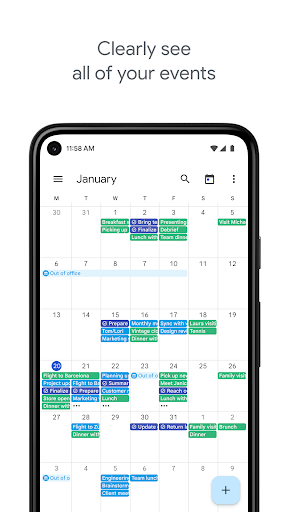
App Intro
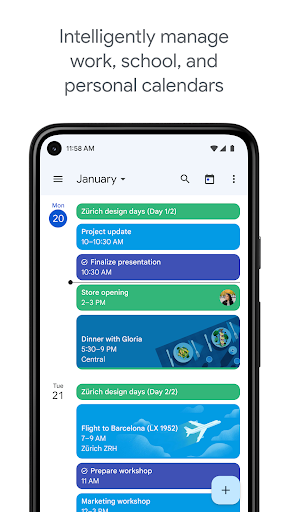
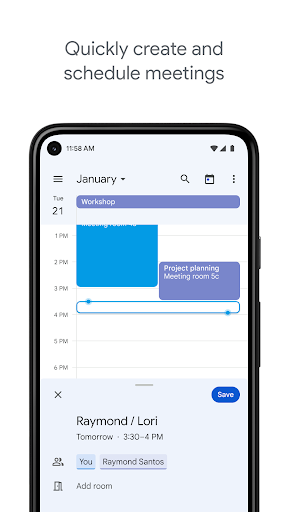
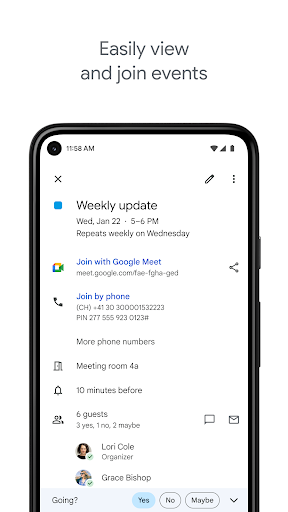
Google Calendar, a key component of Google Workspace, is an indispensable tool for Android users looking to streamline their daily schedules and maximize productivity. This app brilliantly consolidates all your events, from personal appointments to work meetings, into a single, easily navigable interface. Whether you're managing a busy professional life or coordinating personal commitments, Google Calendar offers versatile views—month, week, and day—to suit your planning style. Its integration with Gmail automatically imports event details like flight and hotel bookings, saving you the hassle of manual entry. Furthermore, the ability to manage tasks alongside your calendar events ensures nothing falls through the cracks. It's an essential download for anyone seeking a more organized and efficient approach to managing their time, especially those already within the Google ecosystem or collaborating with others.
Pros
- Automatic event import from Gmail saves significant time.
- Seamless integration with other Google services and apps.
- Versatile event and task management in one place.
- Excellent for team collaboration and resource scheduling.
- Intuitive interface with multiple view options.
Feature Guides
- Effortlessly switch between month, week, and day views to get the perfect overview of your schedule at a glance.
- Events from Gmail, such as flight bookings and dinner reservations, are automatically added, keeping your calendar up-to-date without manual input.
- Seamlessly create, manage, and track your to-do list items directly within the calendar interface, integrating tasks with your scheduled events.
- Consolidates all your calendars, including those from Exchange and other sources, into one unified view for comprehensive schedule management.
- Enhance team collaboration by checking coworker availability, overlaying calendars, and sharing resources or meeting rooms.
Recent Improvements
Recent updates have focused on refining the user experience, making it even smoother to manage your day. The app now offers more intuitive controls for event creation and editing, ensuring quick adjustments on the go. Performance enhancements have also been a priority, leading to faster loading times and a more responsive interface, especially when dealing with complex schedules or multiple integrated calendars. These subtle yet impactful changes contribute to a more seamless and efficient daily planning experience, reinforcing Google Calendar's position as a top-tier productivity tool.
User reviews
This app is a lifesaver! It syncs perfectly with my Gmail and automatically adds all my travel plans. So easy to see my whole week at a glance. 🤩
I've tried other calendar apps, but Google Calendar is the best. The task management feature is surprisingly useful and keeps me organized. Highly recommend! 👍
 Perplexity - Ask AnythingProductivity
 DAVx⁵ – CalDAV CardDAV WebDAVProductivity
 myGovProductivity
 Express Plus CentrelinkProductivity
 myGovIDProductivity
 AI Speech Chatbot Text & VoiceProductivity
 CompanyCamProductivity
 AOL: Email News Weather VideoProductivity
 Easy Voice Recorder ProProductivity
 Email - Fast & Secure MailProductivity
 Lookout - Assisted visionProductivity
 Google AssistantProductivity
 Google DriveProductivity
 Instabridge: WiFi MapProductivity
 ChatAI:AI Chatbot PlusProductivity
 LiveChat - Customer serviceProductivity
 Link to WindowsProductivity
 MiXplorer Silver File ManagerProductivity
 Penly: Digital Planner & NotesProductivity
 Pushbullet: SMS on PC and moreProductivity