
Microsoft SwiftKey Symbols✓
- Name :
- Microsoft SwiftKey Symbols
- Category:
- Education
- Safety :
- 100% Safe
- Price:
- free
- Developer:
- SwiftKey Greenhouse
- Download :
- 50K+
Screenshot


App Intro
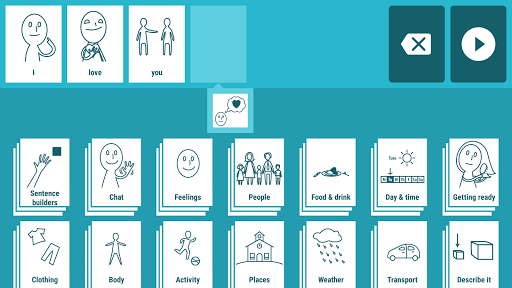
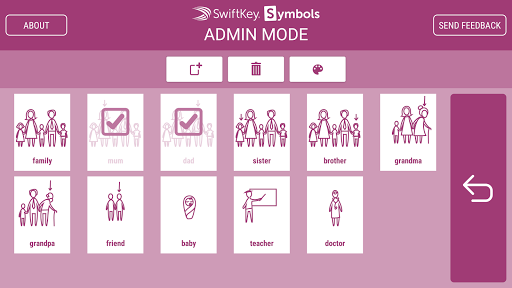
SwiftKey Symbols is an innovative communication aid designed to assist individuals who rely on symbol-based communication. Leveraging the sophisticated predictive text technology that powers SwiftKey's renowned keyboard, this app intelligently suggests the next symbol you'll likely need, streamlining the process of sentence construction. It's particularly beneficial for those facing speech or language challenges, offering a faster and more intuitive way to express thoughts and needs. The app includes an easy-to-use sentence builder and supports multiple languages, making it a versatile tool. For customization, a separate Admin Mode allows users to personalize their symbol library with custom photos, ensuring the app evolves with their communication style. Whether for personal use or therapeutic settings, SwiftKey Symbols aims to empower users by making communication more accessible and efficient. Its release under the SwiftKey Greenhouse initiative highlights its experimental and user-focused development approach.
Pros
- Intelligent symbol prediction saves time.
- Customizable with personal photos.
- Supports multiple languages effectively.
- Intuitive sentence building interface.
- Audio playback for clear expression.
Feature Guides
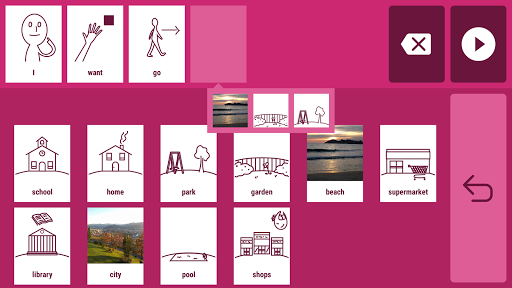
- Intelligently predicts your next symbol choice, speeding up sentence creation and reducing effort.
- Build complete sentences using a visual display and hear them spoken aloud with audio playback.
- Personalize your communication experience by adding your own photos as categories or individual symbols via the Admin Mode.
- Supports multiple languages including English, Spanish, French, and more, with day and time-specific predictions for tailored communication.
- Customizable appearance with options to change colors to suit user preference or environmental factors.
Recent Improvements
Recent refinements to SwiftKey Symbols have focused on enhancing user experience and prediction accuracy. The app now offers more intuitive navigation within the symbol library, making it easier to find and select icons. We've also improved the responsiveness of the sentence builder and audio playback features, ensuring a smoother flow during communication sessions. Further optimizations have been made to the prediction engine, allowing for even more relevant symbol suggestions based on context and user patterns. The Admin Mode has also seen minor tweaks for better stability when adding custom images, ensuring your personalized symbols integrate seamlessly.
User reviews
This app has been a game-changer for my son! He struggles with verbal communication, and SwiftKey Symbols allows him to express himself so much more easily. The prediction feature is surprisingly accurate. 👍
As a speech therapist, I've found SwiftKey Symbols incredibly useful with clients. The ability to add custom photos is brilliant for personalizing communication boards. It's a powerful tool for AAC. 🌟
 Animal Coloring Book for KidsEducation
 Rosetta Stone: Learn, PracticeEducation
 Hand Talk TranslatorEducation
 PictureThis - Plant IdentifierEducation
 Brainly: AI Homework HelperEducation
 brightwheel: Childcare AppEducation
 MagellanTV DocumentariesEducation
 Babbel - Learn LanguagesEducation
 ClassDojoEducation
 Easy Drawing for KidsEducation
 Zutobi: DMV Practice TestEducation
 Translate now Photo translatorEducation
 Picture Insect: Bug IdentifierEducation
 Headway: 15-Min Book SummariesEducation
 IQ Test - Intelligence TestEducation
 IXLEducation
 Lingvano: Sign Language - ASLEducation
 Lumosity: Brain TrainingEducation
 PhotomathEducation
 Smartify: Arts and CultureEducation