

myKindo✓
- Name :
- myKindo
- Category:
- Shopping
- Safety :
- 100% Safe
- Price:
- free
- Developer:
- The Growth Collective Limited
- Download :
- 10K+
Screenshot


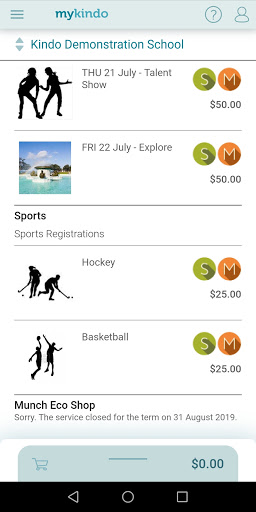


App Intro
The myKindo app is a comprehensive digital platform designed to streamline payments and administrative tasks for schools and clubs. It serves as a central hub where parents and guardians can manage various school-related activities, from ordering lunches and purchasing uniforms to paying fees and signing up for extracurriculars. The app's primary goal is to simplify the often-complex process of school administration for families, consolidating multiple functionalities into a single, user-friendly interface. Whether you need to buy tickets for a school production, subscribe to a sports team's updates, or complete essential online forms, myKindo aims to make these transactions quick and accessible anytime, anywhere. It's an invaluable tool for busy parents seeking efficiency and convenience in managing their children's school affairs, removing the need to navigate multiple systems or remember various payment deadlines.
Pros
- Consolidates school payments and forms in one place.
- Easy ordering for school lunches and events.
- Secure and convenient payment options available.
- Manage multiple children from a single account.
Feature Guides
- Effortlessly manage all your children's school needs from a single dashboard, preventing the need to log in and out of separate accounts.
- Securely make payments for a wide range of school activities, including lunches, uniforms, events, and club subscriptions, using your preferred payment methods.
- Complete and submit essential school forms online, saving time and reducing paperwork for both parents and the school administration.
- Stay informed about school events and team activities by subscribing to updates directly through the app, ensuring you never miss important announcements.
Recent Improvements
Recent updates have focused on enhancing the user experience with smoother navigation and faster loading times, especially when managing multiple children's accounts. We've also refined the payment processing system to offer more flexible options and introduced clearer notifications for upcoming deadlines and new form submissions. The security features have been bolstered to ensure your personal and financial information remains protected, providing greater peace of mind. These refinements are aimed at making your daily interactions with the app more efficient and secure, ensuring that managing school-related tasks is as hassle-free as possible.
User reviews
Absolutely love how easy it is to order lunches for both my kids now! So much better than the old paper slips. 👍
Finally, a single app for everything school-related. Paying for the school trip and signing the permission slip was a breeze. Definitely recommend!
 Free Stuff AppShopping
 Bunnings PowerPassShopping
 DealsDirectShopping
 OfficeworksShopping
 OnePass: Supercharge Your ShopShopping
 SpudshedShopping
 Affirm: Buy now, pay over timeShopping
 Afterpay - Buy Now, Pay LaterShopping
 Alibaba.com - B2B marketplaceShopping
 AliExpressShopping
 APODShopping
 Blue Light CardShopping
 Grays: Auction MarketplaceShopping
 Back Market - Buy & Sell techShopping
 Media Rewards: Gift CardsShopping
 BunningsShopping
 Cashrewards: Cashback RewardsShopping
 Chewy - Where Pet Lovers ShopShopping
 Circle KShopping
 Wish: Shop and SaveShopping