
ArtRage Vitae Mobile Painting✓
- Name :
- ArtRage Vitae Mobile Painting
- Category:
- Art & Design
- Safety :
- 100% Safe
- Price:
- 4.99
- Developer:
- Ambient Design Ltd.
- Download :
- 5K+
Screenshot
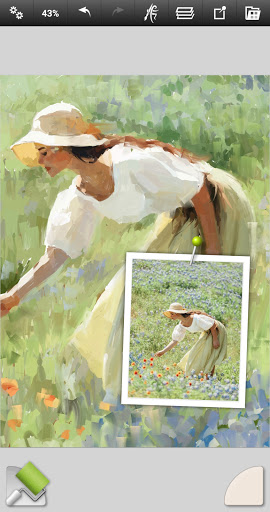


App Intro
ArtRage Vitae stands out as a premium natural painting application designed for mobile devices, aiming to replicate the authentic experience of traditional art tools in a digital format. It's an excellent choice for anyone looking to explore digital art without a steep learning curve, catering to a broad audience from enthusiastic beginners and students to seasoned professional artists. The app boasts a realistic approach to color mixing, allowing oils to blend on textured canvases and watercolors to create smooth gradients, much like their real-world counterparts. Its intuitive interface ensures that creating art feels natural and accessible, making it a worthwhile download for those seeking a powerful yet user-friendly digital painting solution.
Pros
- Realistic paint blending and tool simulation.
- Intuitive interface for all skill levels.
- Wide range of natural and digital tools.
- Supports high-resolution canvases.
- Compatible with desktop ArtRage versions.
Feature Guides
- Experience true-to-life paint mixing with ArtRage Vitae's advanced color blending technology, where simulated oil paints and watercolors interact realistically on various canvas textures.
- Explore a comprehensive suite of 16 natural and digital tools, including realistic oil brushes, pencils, airbrushes, and specialized effects like the Cloner and Glitter Tube, each with customizable settings for thickness, softness, and texture.
- Leverage powerful digital utilities such as multiple layers with blend modes, tracing and reference image import for guided artwork, and unlimited undo/redo functionality to refine your creations without fear of mistakes.
- Take advantage of professional-grade features like adjustable canvas textures, layer effects for added depth and highlights, and the ability to export high-resolution images up to 4096px x 4096px, ensuring your digital art is ready for any purpose.
Recent Improvements
Recent refinements in ArtRage Vitae have focused on enhancing the overall user experience and expanding creative possibilities. The app now offers even more robust layer options, facilitating complex compositions through advanced merging capabilities and the application of sophisticated layer effects. Tool settings have been further optimized to provide a more nuanced and responsive feel, mirroring the subtle characteristics of physical art supplies. These updates ensure that artists can achieve greater precision and expressiveness, making the digital canvas feel even more like a traditional studio.
User reviews
This app is a game-changer for digital painting on my tablet! The paint mixing feels so natural, and I love the variety of brushes. It's like having a real studio in my pocket! 😍
Finally, a drawing app that doesn't feel overly complicated. ArtRage Vitae strikes a perfect balance between powerful features and ease of use. The canvas texture options are a nice touch. Highly recommend! 👍
 AI Image Generator - CreArtArt & Design
 Infinite DesignArt & Design
 Infinite PainterArt & Design
 Pixelcut AI Photo EditorArt & Design
 Symposia: Creative DiscourseArt & Design
 Desygner: Graphic Design MakerArt & Design
 VistaCreate: Graphic DesignArt & Design
 Photoleap: Photo Editor/AI ArtArt & Design
 Pixilart - Make Pixel ArtArt & Design
 PENUP - Share your drawingsArt & Design
 starryai - AI Art GeneratorArt & Design
 Genie: Anime AI Art GeneratorArt & Design
 Bazaart Photo Editor & DesignArt & Design