

Ooredoo SuperApp: Do it all!✓
- Name :
- Ooredoo SuperApp: Do it all!
- Category:
- Communication
- Safety :
- 100% Safe
- Price:
- free
- Developer:
- Ooredoo Maldives
- Download :
- 500K+
Screenshot
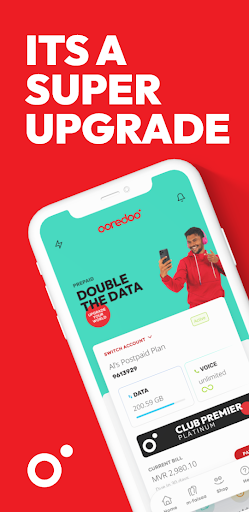
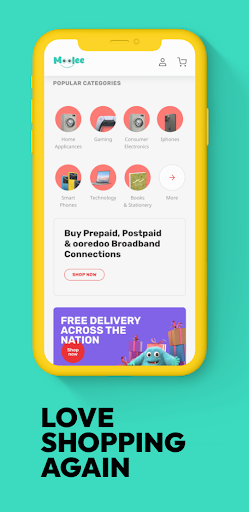
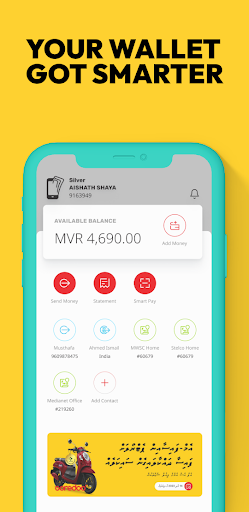


App Intro
The Ooredoo SuperApp aims to consolidate numerous daily digital tasks into a single, user-friendly platform. It's designed for Ooredoo customers in Qatar who seek a streamlined approach to managing their mobile services, engaging in online shopping, and handling financial transactions. From paying bills and recharging accounts to activating specific data add-ons, the app covers essential telco functions. Beyond that, it opens up a 24/7 online marketplace offering a wide array of genuine products with free nationwide delivery, making it a convenient hub for shoppers. Furthermore, the integrated m-Faisaa digital wallet facilitates easy money transfers to friends and merchants, alongside utility bill payments and donations. With round-the-clock live chat support, the app ensures users have assistance readily available. This comprehensive suite of features makes it a compelling download for anyone looking to simplify their digital life.
Pros
- All-in-one management for Ooredoo services.
- Convenient 24/7 online shopping with free delivery.
- Secure and easy money transfers via m-Faisaa wallet.
- Integrated utility bill payments and donations.
- Accessible 24/7 live chat support.
Feature Guides
- Manage all your Ooredoo accounts efficiently, including bill payments, recharges, and activating personalized Magey Plans, gaming packs, or social packs.
- Shop anytime, anywhere from a diverse 24/7 online marketplace featuring 100% genuine products across various categories, with the added benefit of free nationwide delivery.
- Utilize the secure m-Faisaa digital wallet for seamless money transfers to contacts and merchants, as well as for convenient utility bill payments and donations.
- Access instant customer support through a 24/7 live chat feature directly within the app, ensuring your issues are addressed promptly.
Recent Improvements
Recent updates have focused on enhancing the overall user experience, making navigation more intuitive and transactions smoother. The app now offers improved stability for its m-Faisaa wallet, ensuring secure and swift money transfers and payments. Performance optimizations have been implemented across the online marketplace, leading to faster loading times and a more responsive shopping environment. Additionally, customer support integration has been refined, allowing for quicker access to live chat agents and more efficient resolution of queries. These refinements aim to provide a more robust and satisfying digital experience for all users.
User reviews
Love how I can do everything from one app now! Paying bills and shopping is so much easier. The free delivery is a great bonus too! 👍
The Ooredoo SuperApp has made managing my mobile plan and sending money to friends incredibly convenient. The live chat support is also very helpful when I have a question. 😊
 ThreemaCommunication
 moboCommunication
 Burner: Second Phone NumberCommunication
 Phoner 2nd Phone Number + TextCommunication
 ZangiCommunication
 MessagesCommunication
 CC200Communication
 BoostOneCommunication
 Portable WiFi - Mobile HotspotCommunication
 EtherMailCommunication
 Ding Top-up: Mobile RechargeCommunication
 Messenger Kids – The MessagingCommunication
 MyFrontierCommunication
 Glide - Video Chat MessengerCommunication
 Google VoiceCommunication
 Messages by GoogleCommunication
 Google MeetCommunication
 GmailCommunication
 GroupMeCommunication
 Kogan Mobile New ZealandCommunication