

CompanyCam✓
- Name :
- CompanyCam
- Category:
- Productivity
- Safety :
- 100% Safe
- Price:
- free
- Developer:
- CompanyCam
- Download :
- 500K+
Screenshot
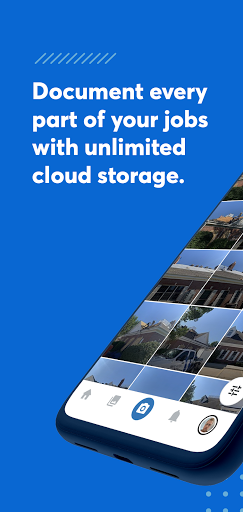


App Intro
CompanyCam is designed to streamline the chaotic world of job site documentation for construction and trade professionals. Instead of sifting through endless, unorganized photos on your phone, this app provides a dedicated platform to capture, annotate, and organize visual evidence of your work. It's an indispensable tool for anyone who needs to track project progress, communicate with teams, or maintain clear records. From the initial site visit to the final walkthrough, CompanyCam ensures that every important detail is captured and readily accessible. If you're tired of generic photo folders and want a more efficient way to manage job-related imagery, this app is certainly worth a look. It’s particularly beneficial for project managers, field supervisors, and anyone who needs to collaborate visually with their team.
Pros
- Organizes job site photos effectively.
- Annotation tools aid clear communication.
- Unlimited photo and document storage.
- Facilitates seamless team collaboration.
- Integrates with popular industry software.
Feature Guides
- Effortlessly capture and organize job site photos with a live feed and project-specific labeling, ensuring you always know what's what. The Before and After camera feature is a game-changer for tracking transformations.
- Enhance your images with built-in drawing and annotation tools, allowing you to highlight key areas or add notes directly onto your photos for clearer communication.
- Foster seamless team collaboration through commenting and user mentions, facilitating instant discussions and feedback right within the context of specific photos or projects.
- Gain quick access to your most important work by starring users, groups, and projects, making your customized home screen a powerful launchpad for daily tasks.
- Leverage unlimited storage and document scanning capabilities to keep all your job-related files in one secure, accessible location, and easily shareable galleries.
Recent Improvements
Recent updates have focused on enhancing the core organizational capabilities and user experience. The ability to customize your home screen further streamlines access to critical projects and team members. We've also seen improvements in the drawing and annotation tools, making it even more intuitive to mark up photos directly in the field. Collaboration features, like commenting and mentions, have been refined to ensure messages are delivered promptly and contextually. Overall, the app feels more responsive, with a continued emphasis on reducing clutter and making it easier for field teams to manage their visual documentation efficiently.
User reviews
This app has been a lifesaver for my business! No more digging through hundreds of random pictures to find the one I need for a specific job. The annotation feature is fantastic for pointing out issues on site. Highly recommend! 👍
Finally, a photo management tool that understands construction work. Being able to see before and after shots side-by-side for each project is incredibly useful for client updates. Also love the integrations with our other software! 💯
 Perplexity - Ask AnythingProductivity
 DAVx⁵ – CalDAV CardDAV WebDAVProductivity
 myGovProductivity
 Express Plus CentrelinkProductivity
 myGovIDProductivity
 AI Speech Chatbot Text & VoiceProductivity
 AOL: Email News Weather VideoProductivity
 Easy Voice Recorder ProProductivity
 Email - Fast & Secure MailProductivity
 Lookout - Assisted visionProductivity
 Google AssistantProductivity
 Google DriveProductivity
 Google CalendarProductivity
 Instabridge: WiFi MapProductivity
 ChatAI:AI Chatbot PlusProductivity
 LiveChat - Customer serviceProductivity
 Link to WindowsProductivity
 MiXplorer Silver File ManagerProductivity
 Penly: Digital Planner & NotesProductivity
 Pushbullet: SMS on PC and moreProductivity