
Link to Windows✓
- Name :
- Link to Windows
- Category:
- Productivity
- Safety :
- 100% Safe
- Price:
- free
- Developer:
- Microsoft Corporation
- Download :
- 1B+
Screenshot




App Intro
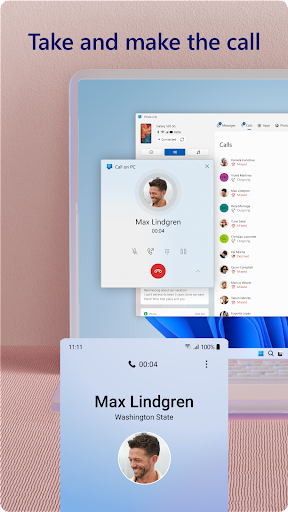
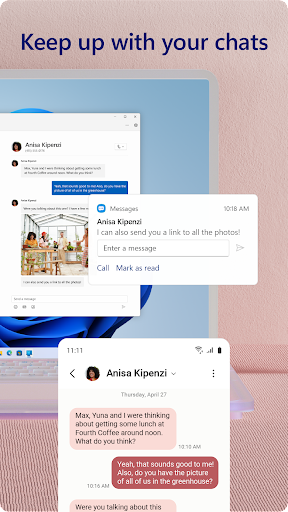
Phone Link, formerly known as Your Phone, bridges the gap between your Android smartphone and your Windows PC, allowing you to seamlessly manage your phone's essential functions without picking it up. It's an invaluable tool for anyone who juggles work and personal life across multiple devices. You can make and receive calls, text your contacts, view notifications, and even access your favorite mobile apps directly on your PC's larger screen. For users with select Samsung, HONOR, or Microsoft Duo devices, the integration is even deeper, offering features like cross-device copy-paste and drag-and-drop file transfers. If you're looking to boost productivity and streamline your digital workflow, Phone Link is definitely worth exploring.
Pros
- Seamlessly manage phone calls and texts from PC.
- View and interact with phone notifications on your computer.
- Easy file transfer between devices.
- Access mobile apps directly on your PC.
- Enhances productivity by integrating phone and PC.
Feature Guides
- Stay connected by making and receiving calls directly from your PC, eliminating the need to reach for your phone.
- Effortlessly manage all your phone's notifications on your PC, ensuring you never miss an important alert.
- Access and use your favorite Android apps on your computer for a more integrated experience.
- Easily transfer files, photos, and content between your phone and PC using drag-and-drop or copy-paste functionality, especially with compatible devices.
- Utilize your PC's superior input methods like keyboard, mouse, and larger display to interact with your phone's interface.
Recent Improvements
Recent updates have focused on enhancing the stability and performance of core functionalities, ensuring a smoother connection between your devices. Users will notice quicker file transfers and a more responsive experience when accessing apps or notifications. There's also been a push towards refining the notification management system, making it even easier to filter and act on alerts without disrupting your PC workflow. The app continues to improve its compatibility with a wider range of Android devices, making its powerful features accessible to more users looking to integrate their mobile and desktop environments.
User reviews
This app is a lifesaver! I can finally respond to texts and check notifications without constantly switching between my phone and PC. The file transfer is super convenient too. 👍
Initially had some connection issues, but after the latest update, it's been much more stable. Love being able to see my phone screen on my computer! 🚀
 Perplexity - Ask AnythingProductivity
 DAVx⁵ – CalDAV CardDAV WebDAVProductivity
 myGovProductivity
 Express Plus CentrelinkProductivity
 myGovIDProductivity
 AI Speech Chatbot Text & VoiceProductivity
 CompanyCamProductivity
 AOL: Email News Weather VideoProductivity
 Easy Voice Recorder ProProductivity
 Email - Fast & Secure MailProductivity
 Lookout - Assisted visionProductivity
 Google AssistantProductivity
 Google DriveProductivity
 Google CalendarProductivity
 Instabridge: WiFi MapProductivity
 ChatAI:AI Chatbot PlusProductivity
 LiveChat - Customer serviceProductivity
 MiXplorer Silver File ManagerProductivity
 Penly: Digital Planner & NotesProductivity
 Pushbullet: SMS on PC and moreProductivity