

Google Find My Device✓
- Name :
- Google Find My Device
- Category:
- Tools
- Safety :
- 100% Safe
- Price:
- free
- Developer:
- Google LLC
- Download :
- 100M+
Screenshot

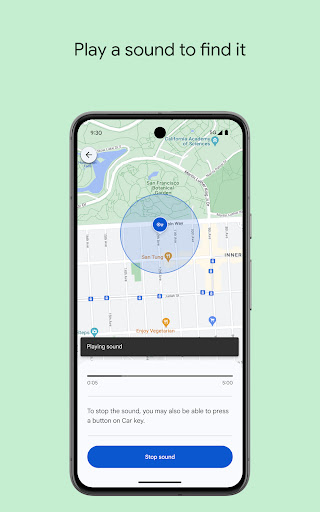

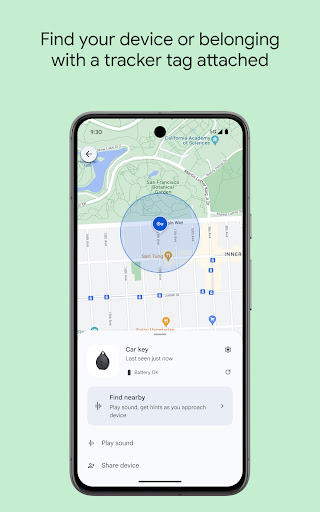
App Intro
Losing an Android device can be a stressful experience, but Google's Find My Device app offers a robust solution to help you locate, secure, and even remotely wipe your lost or stolen phone or tablet. This essential utility acts as a digital lifeline, allowing you to pinpoint your device's last known location on a map, play a loud sound to find it if it's nearby (even if silenced!), or remotely lock it with a custom message and contact information. For those times when recovery seems unlikely, the app also provides the option to erase all data, protecting your personal information from falling into the wrong hands. It's an indispensable tool for any Android user, offering peace of mind and a critical layer of security for your valuable devices.
Pros
- Locates lost or stolen Android devices on a map.
- Remotely lock device and display custom message.
- Erase all data to protect privacy.
- Play sound even when device is silent.
- Works with multiple devices under one account.
Feature Guides
- Pinpoint your device's current or last known location on a map, providing real-time tracking capabilities.
- Play a loud sound on your device, perfect for locating it when it's misplaced nearby, regardless of its silent setting.
- Remotely lock your device and display a custom message or contact number on the lock screen, aiding its return if found by someone honest.
- Erase all data from your device as a last resort to protect your privacy if the device cannot be recovered.
- View network and battery status to understand your device's condition remotely.
Recent Improvements
Recent updates have focused on refining the accuracy of location services, ensuring that even if a device has been offline for a short period, its last known position is reported with greater precision. The user interface has also seen subtle enhancements, making it more intuitive to access the lock and erase functions. Integration with Google Maps for navigation has been streamlined, offering a quicker path from locating your device to actively seeking it out. These refinements contribute to a smoother, more reliable experience when you need the app the most.
User reviews
This app saved my phone! I left it at a cafe, and the 'play sound' feature helped me find it under a table. So relieved! 🙏
Lost my tablet during a move. Used the remote lock and message feature. Thankfully, a kind person found it and contacted me via the message. Couldn't have done it without this app. Highly recommend! 👍
 AppLock LiteTools
 My OptusTools
 Fires Near Me AustraliaTools
 Service NSWTools
 Authenticator App - SafeAuthTools
 fitproTools
 AVG AntiVirus & SecurityTools
 Google Play StoreTools
 System Update for AndroidTools
 Move to iOSTools
 AZIP Master: ZIP / RAR, UnzipTools
 My SpectrumTools
 Cast for Chromecast & TV CastTools
 CoinSnap - Coin IdentifierTools
 DuckDuckGo Private BrowserTools
 TeraBox: Cloud Storage SpaceTools
 Fatic PlusTools
 MyRogersTools
 Voice AccessTools
 Google TranslateTools