

Photo Compressor and Resizer✓
- Name :
- Photo Compressor and Resizer
- Category:
- Tools
- Safety :
- 100% Safe
- Price:
- free
- Developer:
- Pocket App Maker
- Download :
- 1M+
Screenshot


App Intro
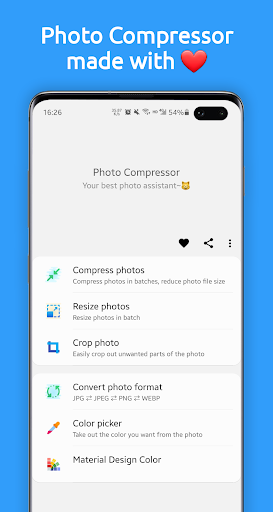
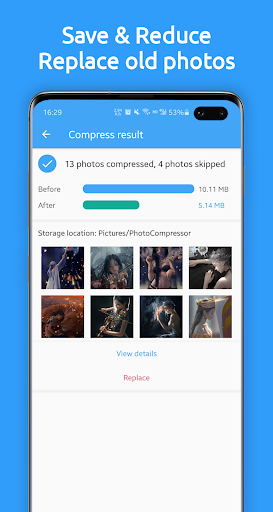
Photo Compressor is a handy utility designed to significantly reduce the file size of your photos without a noticeable loss in quality. Whether you're looking to free up precious storage space on your mobile device, speed up photo uploads, or meet specific file size requirements for sharing or applications, this app offers a streamlined solution. It leverages intelligent lossy compression techniques, skillfully reducing the data needed to store an image by optimizing color information. Beyond compression, it also provides essential editing tools like cropping and resizing, allowing you to fine-tune your images before or after compression. This makes Photo Compressor a versatile tool for anyone dealing with large image files, from casual users wanting to manage their photo library to those who need precise control over image dimensions and file sizes.
Pros
- Effective photo compression with minimal quality loss.
- Supports batch processing for multiple photos.
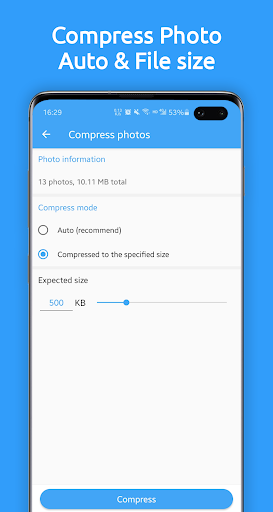
- Offers both automatic and custom size compression.
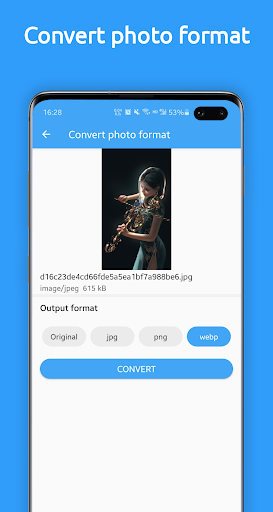
- Allows photo resizing and format conversion.
- Free to use with essential features.
Feature Guides
- Compress photos effortlessly using two distinct modes: 'Auto' for a quick, optimized experience or 'Compress to specified file size' for exact KB/MB targets. Batch processing is available for both modes, saving you time when handling multiple images.
- Adjust photo dimensions and resolution with ease. You can reduce or enlarge photos while preserving their original aspect ratio, and even set custom resolutions like 1920x1080 or 3040x1440.
- Convert your images between popular formats including JPEG, JPG, PNG, and WEBP, offering flexibility for various needs.
- Utilize the cropping tool to remove unwanted parts of your photos and select from various aspect ratios to achieve the perfect composition.
Recent Improvements
Recent updates have focused on refining the compression algorithms, ensuring even better balance between file size reduction and visual fidelity. Users will appreciate the enhanced batch processing capabilities, which now offer a smoother and more responsive experience when handling large volumes of photos. Furthermore, the interface has seen subtle but impactful tweaks for improved navigation, making it quicker to find and utilize the various compression and resizing options. The app's stability has also been a key area of improvement, leading to fewer interruptions during compression tasks.
User reviews
This app is a lifesaver! 🥳 My phone's storage was constantly full, but Photo Compressor helped me shrink all my photos without making them look pixelated. Batch compression is a game-changer!
Exactly what I needed to get my photos under the file size limit for an online submission. The 'Compress to specified file size' feature worked perfectly. So easy to use! 👍
 AppLock LiteTools
 My OptusTools
 Fires Near Me AustraliaTools
 Service NSWTools
 Authenticator App - SafeAuthTools
 fitproTools
 AVG AntiVirus & SecurityTools
 Google Play StoreTools
 System Update for AndroidTools
 Move to iOSTools
 AZIP Master: ZIP / RAR, UnzipTools
 My SpectrumTools
 Cast for Chromecast & TV CastTools
 CoinSnap - Coin IdentifierTools
 DuckDuckGo Private BrowserTools
 TeraBox: Cloud Storage SpaceTools
 Fatic PlusTools
 MyRogersTools
 Voice AccessTools
 Google Find My DeviceTools