

Simple File Manager Pro✓
- Name :
- Simple File Manager Pro
- Category:
- Tools
- Safety :
- 100% Safe
- Price:
- 1.19
- Developer:
- Simple Mobile Tools
- Download :
- 100K+
Screenshot

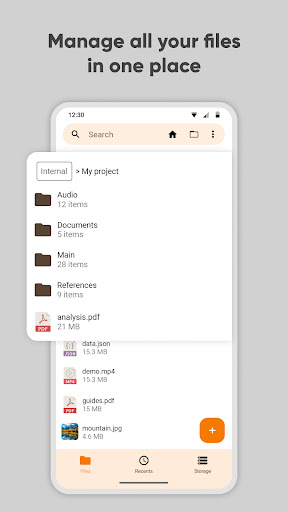


App Intro
Simple File Manager is a robust yet incredibly easy-to-use application designed for Android users who need efficient control over their device's storage. It offers a comprehensive suite of tools for managing files and folders, making tasks like compressing, transferring, and organizing media a breeze. Whether you're looking to quickly access your most-used directories, sort files by various criteria, or even secure sensitive data, this app has you covered. Its intuitive interface, coupled with powerful features like file property inspection and a handy light editor, makes it an indispensable tool for anyone wanting to declutter their digital life and save valuable time and energy. For users prioritizing privacy and a clean, ad-free experience, Simple File Manager stands out as a top-tier choice.
Pros
- Extremely fast and responsive file operations.
- Completely ad-free and requires no unnecessary permissions.
- Robust security features for protecting your data.
- Intuitive interface with material design and dark theme.
- Excellent privacy with offline functionality.
Feature Guides
- Effortlessly manage all your files and folders with essential operations like copy, paste, cut, delete, rename, and compress. It also supports decompressing various archive formats.
- Quickly find any file or folder using the powerful search functionality, or set up custom home folders and favorite shortcuts for instant access to your most important data.
- Enhance your privacy with robust security features, including password protection for hidden files or the entire app, with options for pattern, PIN, or biometric locks.
- Gain valuable insights into your storage usage with the built-in Storage Analysis tool, which helps identify large files and folders, allowing you to free up space efficiently.
- Access and manage files across your internal storage, SD cards, and USB devices, with support for a wide range of file formats including images, videos, music, and documents.
Recent Improvements
Recent updates have focused on refining the user experience with subtle enhancements to navigation and file sorting options. The app's performance has been optimized for even quicker access to large directories and more responsive file operations. Additionally, improvements have been made to the file property display, offering more detailed information at a glance without compromising the app's signature simplicity. These refinements ensure that managing your device's storage remains a seamless and efficient process, keeping your data organized and accessible.
User reviews
This file manager is a lifesaver! So fast and clean, no ads at all. Love the dark theme and how it helps me organize everything. 🤩
Finally, a file manager that respects my privacy. Works offline and has all the features I need without being bloated. Highly recommend! 👍
 AppLock LiteTools
 My OptusTools
 Fires Near Me AustraliaTools
 Service NSWTools
 Authenticator App - SafeAuthTools
 fitproTools
 AVG AntiVirus & SecurityTools
 Google Play StoreTools
 System Update for AndroidTools
 Move to iOSTools
 AZIP Master: ZIP / RAR, UnzipTools
 My SpectrumTools
 Cast for Chromecast & TV CastTools
 CoinSnap - Coin IdentifierTools
 DuckDuckGo Private BrowserTools
 TeraBox: Cloud Storage SpaceTools
 Fatic PlusTools
 MyRogersTools
 Voice AccessTools
 Google Find My DeviceTools