

Copy to Clipboard✓
- Name :
- Copy to Clipboard
- Category:
- Tools
- Safety :
- 100% Safe
- Price:
- free
- Developer:
- Backslash-\t
- Download :
- 100K+
Screenshot
App Intro
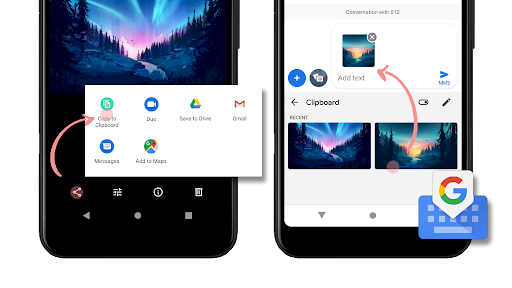
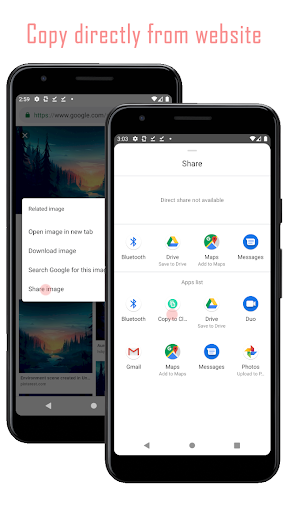
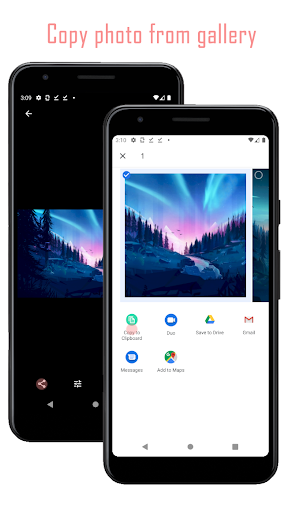
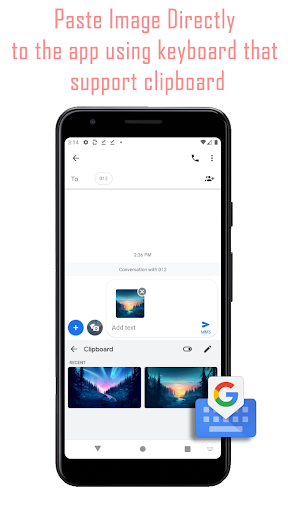
This straightforward utility app addresses a specific, yet common, frustration for Android users: the inability to directly copy and paste multiple photos into certain applications, particularly for social media stories. While Android's native functionality for handling image copying is limited, this app provides a clever workaround. By allowing you to copy images from your gallery directly to the clipboard, it leverages the capabilities of Gboard, Google's popular keyboard app. Once an image is on your clipboard via this app, Gboard can then paste it seamlessly into other apps that support image pasting. It’s a niche tool, but for those struggling with the limitations of multi-photo sharing in stories or similar contexts, it offers a much-needed solution. If you frequently find yourself wanting to share multiple images in a format that doesn't natively support it, this app is worth a look.
Pros
- Effortlessly copies photos to clipboard.
- Enables multi-photo pasting workaround.
- Simple and intuitive user interface.
- Works well with Gboard integration.
- Solves a common Android limitation.
Feature Guides
- Effortlessly copy single or multiple photos from your device's gallery directly to the clipboard.
- Seamlessly integrates with Gboard (Google Keyboard) to enable image pasting into other applications, bypassing native Android limitations.
- A practical workaround for sharing multiple images in social media stories or other platforms where direct multi-image upload is cumbersome or unsupported.
- Simple, intuitive interface designed for quick and easy operation, making the process of copying photos a breeze.
Recent Improvements
Recent updates have focused on refining the user experience and ensuring broader compatibility with the latest Android versions. We've streamlined the image selection process, making it quicker to choose and copy photos. Additionally, performance optimizations have been implemented to reduce app load times and ensure a smoother workflow when copying multiple images. The integration with Gboard has also been tested and improved for greater reliability. Our goal is to provide a consistently stable and efficient tool for managing image copying needs.
User reviews
This app is a lifesaver for creating Instagram stories! I was so tired of only being able to add one photo at a time. Now, I can copy a bunch from my gallery and paste them easily with Gboard. Works perfectly! 👍
Finally, a way to get multiple photos into my notes app without saving them all. It’s simple, does exactly what it says, and has saved me so much time. Definitely recommend if you’re an Android user who struggles with image copying. 😊
 AppLock LiteTools
 My OptusTools
 Fires Near Me AustraliaTools
 Service NSWTools
 Authenticator App - SafeAuthTools
 fitproTools
 AVG AntiVirus & SecurityTools
 Google Play StoreTools
 System Update for AndroidTools
 Move to iOSTools
 AZIP Master: ZIP / RAR, UnzipTools
 My SpectrumTools
 Cast for Chromecast & TV CastTools
 CoinSnap - Coin IdentifierTools
 DuckDuckGo Private BrowserTools
 TeraBox: Cloud Storage SpaceTools
 Fatic PlusTools
 MyRogersTools
 Voice AccessTools
 Google Find My DeviceTools