

DrawPlan✓
- Name :
- DrawPlan
- Category:
- Productivity
- Safety :
- 100% Safe
- Price:
- free
- Developer:
- Fleet Investments LLC
- Download :
- 1M+
Screenshot
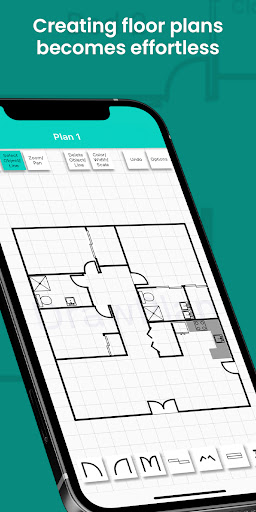


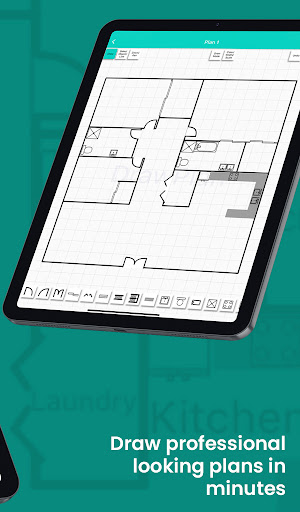
App Intro
DrawPlan is a straightforward yet powerful application designed to help users create professional-looking architectural and design plans with ease. Whether you're sketching out a new home layout, redesigning an office space, or planning electrical circuits, DrawPlan offers an intuitive interface to bring your ideas to life. The app allows for quick drawing of lines and the addition of various objects and labels, making it simple to add detail and clarity to your designs. For those needing more advanced features like exporting to their camera roll or sharing plans with colleagues via SMS and email, a Pro upgrade is available, which also unlocks the ability to use custom objects. It's an ideal tool for homeowners, interior designers, contractors, and anyone needing a fast way to visualize and communicate design concepts without the complexity of professional CAD software.
Pros
- Quick and easy plan creation.
- Intuitive touch-based drawing interface.
- Useful for various design types.
- Pro version offers essential export features.
- Custom object addition in Pro version.
Feature Guides
- Effortlessly sketch out floor plans, office layouts, or electrical designs using simple touch controls to draw lines and add essential elements.
- Enhance your plans with a variety of pre-set objects and labels, allowing for quick annotation and detailed representation of spaces and components.
- The Pro version unlocks advanced functionality, including the ability to export your finished plans directly to your device's camera roll or share them seamlessly via SMS and email, perfect for client presentations or team collaboration.
- Customize your designs further by adding your own unique objects in the Pro version, providing even greater flexibility for specialized planning needs.
Recent Improvements
Recent updates have focused on refining the user experience, making the drawing and labeling process even more fluid and responsive. We've also improved the stability of plan saving and export functions, ensuring that your creative work is preserved and easily shareable. Performance enhancements mean that even complex plans load and render faster, allowing for quicker iteration and review. These subtle yet impactful changes aim to make DrawPlan an even more reliable tool for all your planning needs, from quick sketches to detailed blueprints.
User reviews
This app is a lifesaver for quickly mocking up furniture arrangements in my new apartment! 🛋️ Super intuitive and fast.
Used it to plan a small garden layout and it worked perfectly. The Pro features for exporting are really handy for showing my spouse. 👍
 Perplexity - Ask AnythingProductivity
 DAVx⁵ – CalDAV CardDAV WebDAVProductivity
 myGovProductivity
 Express Plus CentrelinkProductivity
 myGovIDProductivity
 AI Speech Chatbot Text & VoiceProductivity
 CompanyCamProductivity
 AOL: Email News Weather VideoProductivity
 Easy Voice Recorder ProProductivity
 Email - Fast & Secure MailProductivity
 Lookout - Assisted visionProductivity
 Google AssistantProductivity
 Google DriveProductivity
 Google CalendarProductivity
 Instabridge: WiFi MapProductivity
 ChatAI:AI Chatbot PlusProductivity
 LiveChat - Customer serviceProductivity
 Link to WindowsProductivity
 MiXplorer Silver File ManagerProductivity
 Penly: Digital Planner & NotesProductivity