

Asana: Work in one place✓
- Name :
- Asana: Work in one place
- Category:
- Business
- Safety :
- 100% Safe
- Price:
- free
- Developer:
- Asana, Inc.
- Download :
- 5M+
Screenshot




App Intro
Asana is a robust work management platform designed to streamline project execution and individual task management for teams of all sizes. It offers a comprehensive solution for organizing workflows, ensuring clarity on responsibilities, deadlines, and execution details. Whether you're coordinating a large-scale project or managing your daily to-do list, Asana provides the structure needed to stay on track. Its versatility shines through its ability to adapt to various work styles, making it an indispensable tool for organizations aiming to boost productivity and collaboration. With features like customizable project views, task prioritization, and seamless communication channels, Asana empowers users to focus on what matters most and deliver results efficiently. It's particularly well-suited for teams struggling with scattered information, unclear objectives, or project bottlenecks. If your goal is to bring order to complex projects and enhance team synergy, Asana is a download worth considering.
Pros
- Centralizes team projects and tasks effectively.
- Offers multiple views for task and project organization.
- Facilitates seamless team communication within tasks.
- Excellent for both individual and team productivity.
- Accessible across web and mobile platforms.
Feature Guides
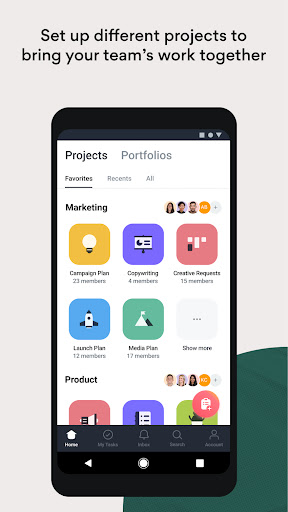
- Organize team projects in a unified space, breaking down large workloads into manageable tasks with assigned owners and due dates. Choose from list, Kanban board, or calendar views to match your preferred workflow.
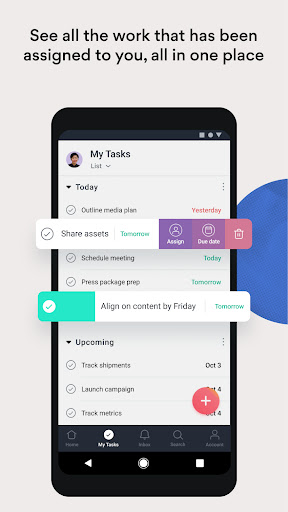
- Enhance personal productivity with 'My Tasks,' a consolidated to-do list that allows easy prioritization through drag-and-drop functionality, custom sections, and sorting options.
- Facilitate continuous collaboration with in-task commenting, file attachments, and direct team messaging, ensuring everyone stays informed and connected regardless of their location.
- Gain deeper insights and advanced project control through features like Portfolios for project overview, Custom Fields for tailored data capture, Timeline view for Gantt-style planning, and Goals for tracking strategic objectives.
Recent Improvements
Recent updates to Asana have focused on refining the user experience, making it even more intuitive to navigate and manage complex projects. Enhanced collaboration tools ensure that communication flows seamlessly within tasks, reducing the need to switch between different applications. Performance optimizations have also been implemented, leading to quicker loading times and a smoother overall interaction, especially when dealing with large projects or extensive task lists. The goal is to provide a more cohesive and efficient work environment, allowing teams to focus on execution rather than getting bogged down by the tools themselves. These refinements aim to solidify Asana's position as a leading platform for project and work management.
User reviews
Asana has been a game-changer for my team! We finally have a central place for all our projects, and I love how easy it is to see what everyone is working on. The mobile app is great for staying updated on the go 🚀.
I've been using Asana for individual task management for months now and it's fantastic. The 'My Tasks' section keeps me organized and focused. Dragging and dropping tasks to prioritize is surprisingly satisfying! Highly recommend. 👍
 SlackBusiness
 Amazon ChimeBusiness
 Amazon SellerBusiness
 AnyDesk Remote DesktopBusiness
 Wabi - Virtual Phone NumberBusiness
 BlueJeans Video ConferencingBusiness
 iScanner - PDF Scanner AppBusiness
 RemindersBusiness
 Cloud Cover MusicBusiness
 Crew Messaging and SchedulingBusiness
 CES 2024Business
 Duo MobileBusiness
 Free Conference CallBusiness
 Indeed Job SearchBusiness
 JetSign: Fill & Sign PDF FormsBusiness
 Microsoft TeamsBusiness
 OfficeSuite Pro + PDFBusiness
 PDF Extra: Scan, Edit & OCRBusiness
 Shipt Shopper: Shop for PayBusiness
 SiriusXM DealerBusiness