
BeautyPlus - Retouch, Filters✓
- Name :
- BeautyPlus - Retouch, Filters
- Category:
- Photography
- Safety :
- 100% Safe
- Price:
- free
- Developer:
- PIXOCIAL TECHNOLOGY (SINGAPORE) PTE. LTD.
- Download :
- 100M+
Screenshot


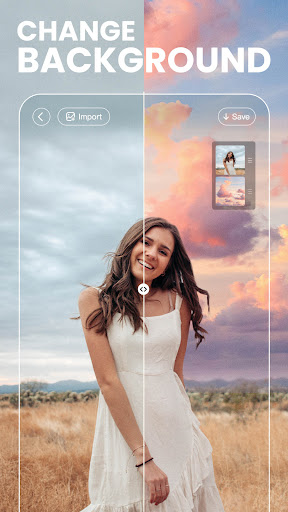
App Intro
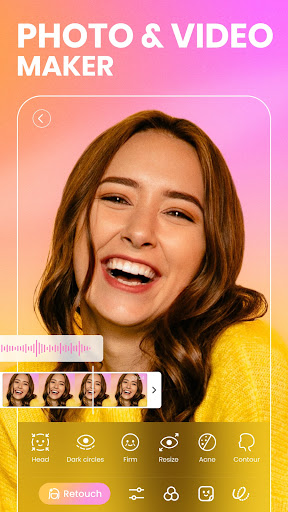
BeautyPlus stands out as a comprehensive selfie camera and photo editing application, utilized by an impressive 800 million users globally. Its core function is to empower users to achieve perfect-looking selfies and enhance their photos with a suite of intuitive yet powerful tools. Whether you're looking to smooth skin, brighten eyes, whiten teeth, or even subtly reshape your features, BeautyPlus offers solutions. Beyond touch-ups, it extends to removing unwanted objects, adding artistic filters, and applying trendy makeup effects, making professional-grade photo refinement accessible to everyone. It's an ideal download for anyone who wants to elevate their social media presence or simply improve their personal photos with natural-looking results, without needing extensive editing experience.
Pros
- Effortless selfie enhancement with auto-beautification.
- Powerful object removal with AI technology.
- Wide range of natural-looking makeup effects.
- Intuitive tools for skin and body editing.
- Extensive collection of filters and stickers.
Feature Guides
- Achieve consistently flawless selfies with the signature Auto-Beautification tool, designed to enhance your natural look instantly.
- Access over 30 easy-to-use editing tools, including skin smoothing, acne removal, teeth whitening, and body reshaping, to achieve professional photo results.
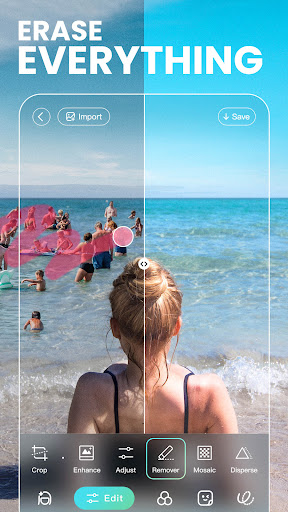
- Remove unwanted objects from your photos seamlessly with the powerful AI-powered remover, ensuring a clean and polished final image.
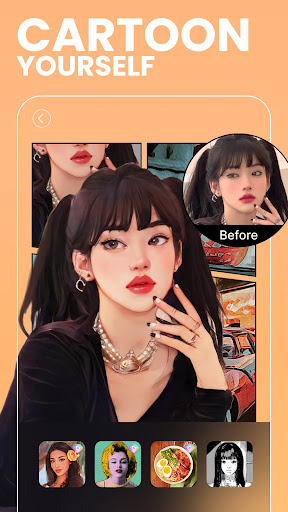
- Experiment with a vast array of filters, AR stickers, and makeup effects to add creativity and style to your photos and real-time selfies.
- Enhance your photos with advanced options like text overlays, collage creation, and a magic brush for unique artistic expression.
Recent Improvements
Recent updates have focused on refining the AI-powered object removal tool, making it more precise and efficient for erasing unwanted elements from photos. Users will notice smoother skin retouching algorithms that produce more natural-looking results, avoiding an over-processed appearance. Additionally, the library of trendy makeup and AR stickers has been expanded, offering fresh ways to personalize selfies. Performance enhancements have also been implemented across the editing suite, ensuring a more fluid and responsive user experience, even when working with high-resolution images.
User reviews
This app is a lifesaver for my social media pics! The auto-beautify is surprisingly good, and I love how easy it is to remove random photobombers. Definitely recommend it! ✨
I've tried so many photo editors, but BeautyPlus is my favorite. The makeup options look so natural, and the skin smoothing is perfect without making me look fake. Great job! 👍
 Filter Cam for WA Video CallPhotography
 Amazon PhotosPhotography
 Canon Mini PrintPhotography
 AI Photo Editor, Collage-FotorPhotography
 Camera FV-5Photography
 PhotoScan by Google PhotosPhotography
 Photo Studio PROPhotography
 Lensa: photo editor AIPhotography
 Manual Camera: DSLR Camera ProPhotography
 1 Hour Photo: CVS Photo PrintsPhotography
 Photo Scan App by PhotomynePhotography
 PhotoPillsPhotography
 PREQUEL AI Filter Photo EditorPhotography
 Shutterfly: Prints Cards GiftsPhotography
 Simple Gallery App - ProPhotography
 SkylightPhotography
 Galleryit - Photo Vault, AlbumPhotography
 SELPHY Photo LayoutPhotography
 Camera ZOOM FX PremiumPhotography
 FaceApp: Perfect Face EditorPhotography