
SELPHY Photo Layout✓
- Name :
- SELPHY Photo Layout
- Category:
- Photography
- Safety :
- 100% Safe
- Price:
- free
- Developer:
- Canon Inc.
- Download :
- 1M+
Screenshot




App Intro
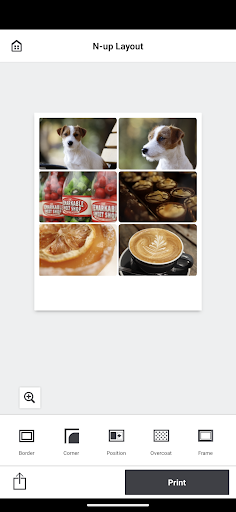
Canon SELPHY Photo Layout is a specialized application designed to enhance your photo printing experience with Canon's SELPHY compact photo printers. It allows users to curate and arrange multiple images into custom layouts directly from their smartphones or tablets, making it easier than ever to print personalized photo collages, ID photos, or themed prints. Whether you're looking to create a scrapbook page, design unique stationery, or simply organize your favorite memories into a single print, this app streamlines the process. It's an essential download for owners of compatible SELPHY models, offering a bridge between your digital photo library and tangible prints, and it works seamlessly with services like image.canon for cloud-based photo access. For users who value creative control and efficient printing, this app is a fantastic tool.
Pros
- Create custom multi-image print layouts.
- Seamless integration with SELPHY printers.
- Offers various creative editing tools.
- Supports cloud photo services like image.canon.
- Saves printing history for easy reprints.
Feature Guides
- Craft custom photo layouts: Arrange multiple pictures into various designs like collages, bookmarks, or even ID photos, giving you complete creative freedom before you print.
- Seamless printing integration: Works with your Canon SELPHY printer to transfer your designed layouts for high-quality physical prints. Note that for certain models (CP1300, CP1200, CP910, and CP900), the Canon PRINT Inkjet/SELPHY app needs to be installed separately.
- Save your printing history: Keep track of your created layouts and print jobs, making it easy to revisit and reprint your favorite arrangements or track your printing habits.
- Access photos from cloud services: Easily import images directly from web services like image.canon, expanding your options beyond just your device's local storage.
Recent Improvements
Recent updates have focused on refining the user experience and expanding compatibility with newer SELPHY models, ensuring a smoother workflow for creating and printing your favorite photos. Users will appreciate the improved stability and responsiveness when arranging images and applying creative edits like filters, stamps, and text. The integration with cloud services has also seen enhancements, making it quicker to pull photos from sources like image.canon. These refinements aim to make the process of designing and printing personalized photo layouts more intuitive and efficient for all users, regardless of their chosen SELPHY printer model.
User reviews
This app is a lifesaver for my SELPHY printer! I love being able to arrange multiple photos into one print. So much better than just printing single shots. 😎
Finally, a way to make custom photo strips for my travel journal! It took a little getting used to, but the layout options are fantastic and printing was a breeze. 🌟
 Filter Cam for WA Video CallPhotography
 Amazon PhotosPhotography
 Canon Mini PrintPhotography
 BeautyPlus - Retouch, FiltersPhotography
 AI Photo Editor, Collage-FotorPhotography
 Camera FV-5Photography
 PhotoScan by Google PhotosPhotography
 Photo Studio PROPhotography
 Lensa: photo editor AIPhotography
 Manual Camera: DSLR Camera ProPhotography
 1 Hour Photo: CVS Photo PrintsPhotography
 Photo Scan App by PhotomynePhotography
 PhotoPillsPhotography
 PREQUEL AI Filter Photo EditorPhotography
 Shutterfly: Prints Cards GiftsPhotography
 Simple Gallery App - ProPhotography
 SkylightPhotography
 Galleryit - Photo Vault, AlbumPhotography
 Camera ZOOM FX PremiumPhotography
 FaceApp: Perfect Face EditorPhotography